'/%3E%3C/svg%3E)
'/%3E%3Cpath%20fill='%23b2b2b2'%20d='M241%20382q0%2016%2017%2026%2017%2011%2042%2011t42-11q16-11%2017-26V269H241'/%3E%3Cpath%20fill='%239f7e00'%20d='M241%20379q0%2014%208%2023%209%209%2021%209%2014%200%2021-9%209-9%209-23V269h-59'/%3E%3Cpath%20d='M241%20339v-70h59v110q0%2014-9%2023l-6%205v-68h-15v72q-8%200-14-4v-68zm59%2040c0%2022%2015%2032%2029%2032%2021%200%2030-18%2030-32v-40h-59'/%3E%3Cpath%20fill='%239f7e00'%20d='M266%20277v5h2v12h-3v-5h2v-5h-9v5h2v5h-4v9h3v18h-5v10h34v-10h-5v-18h3v-9h-4v-5h2v-5h-9v5h2v5h-3v-12h2v-5zm42%20101q0%2010%206%2017%206%206%2015%207%2010-1%2016-7%206-7%206-17v-29h-43'/%3E%3Ccircle%20fill='%230044ad'%20cx='329.5'%20cy='372'%20r='6'/%3E%3Cellipse%20fill='%230044ad'%20cx='300'%20cy='340'%20rx='16'%20ry='21'/%3E%3C/svg%3E)

A database management system (DBMS) is the software that stores data, keeps it in order and serves it to whoever asks for it, so that each program does not have to worry about how the data is stored. MySQL, PostgreSQL, Oracle, SQL Server and SQLite are all database management systems.
To understand why they exist, it helps to start with what came before them: files.
Before databases: files
A file is a structure in which an application stores its data. Its format decides how its contents are interpreted, and files are usually split into two groups:
- Text files (or plain files): they contain readable characters, almost always encoded in UTF-8 nowadays. For example, configuration files (
.ini,.conf), source code (.sql,.java) or web pages (.html,.css). - Binary files: they need a program that understands their format. For example, images (
.jpg,.png), videos (.mp4), archives (.zip) or documents (.docx,.odt).
For decades, each application kept its data in its own files. That worked while there was little data and few programs, but problems appeared as they grew.
Why files fell short
- Redundancy: the same data was repeated in several files, wasting space.
- Inconsistency: if a repeated value was updated in one place and not in the others, each file said something different.
- Hard access: every new query meant writing a new program.
- Isolated data: files in different formats, scattered across several folders and machines.
- Integrity: the rules (for example, "the balance cannot be negative") were hidden in the code of each program.
- Atomicity: if a failure interrupted an operation halfway (a transfer that has already taken the money from one account but not yet added it to the other), the data was left half-changed.
- Concurrent access: two users changing the same file at the same time could overwrite each other's changes.
- Security: it was hard to control who could see or change each piece of data.
Database management systems were created to solve all of this in a single place. If you are curious about how we got here, read the history of databases: from paper index cards to the first hierarchical and network models of the 1960s, Edgar F. Codd's relational model (1970) and the NoSQL databases of this century.
Database, database management system and database system
Three terms that are often mixed up:
- Database: a set of related data organized around the same problem (a shop's customers, products and orders, for example).
- Database management system (DBMS): the software used to define, query, change and protect that data.
- Database system: the whole thing, made up of the data, the DBMS, the applications that use it and the people who work with it.
Types of databases
By data model:
- Hierarchical: data is organized as a tree (parents and children).
- Network: like hierarchical, but a record can have several "parents".
- Relational: data is stored in tables linked by keys. They are the most widespread. Find out more in what are relational databases.
- Object-oriented: they store objects, as in object-oriented programming.
- NoSQL: document, key-value, column-family and graph databases, designed for loosely structured data or very large volumes. See the differences between relational and non-relational databases.
By where the data lives:
- Centralized: on a single server.
- Distributed: spread across several machines that work as a single database.
By what they are used for:
- Transactional (OLTP): many short, everyday operations, such as sales or bookings.
- Analytical (OLAP) or multidimensional: large volumes of historical data for reports and analysis.
Types of database management systems
- Desktop or embedded: for small databases, on a single computer or inside an application. Examples: Microsoft Access, LibreOffice Base or SQLite (built into countless applications and phones).
- Client-server: a server handles many users and applications at once. They can be commercial, such as Oracle Database, Microsoft SQL Server or IBM Db2, or open source, such as PostgreSQL, MySQL or MariaDB.
- Cloud: the provider takes care of the server, backups and updates. Examples: Amazon RDS, Azure SQL Database or Google Cloud SQL.
If you want to try one, here is a comparison of database management tools.
What a DBMS does
- Data definition: creating the structure (tables, data types, constraints).
- Data manipulation: inserting, querying, updating and deleting.
- Access control: deciding which user can do what.
- Integrity: enforcing the data rules, such as primary and foreign keys.
- Concurrency: letting many users work at once without clashing, through transactions with the ACID properties (atomicity, consistency, isolation and durability).
- Backup and recovery: getting back to a correct state after a failure.
- Data dictionary: storing the description of the database itself (more on this below).
DBMS architecture: its components
Internally, a database management system is organized into three main components:
- Query processor: it receives statements (in SQL, for example), checks them, works out the most efficient way to run them (the optimizer) and runs them.
- Storage manager: the bridge between the data stored on disk and the rest of the system. It handles files, indexes and the memory buffer.
- Transaction manager: it keeps the database consistent despite failures or many simultaneous users. It controls concurrency and recovery.
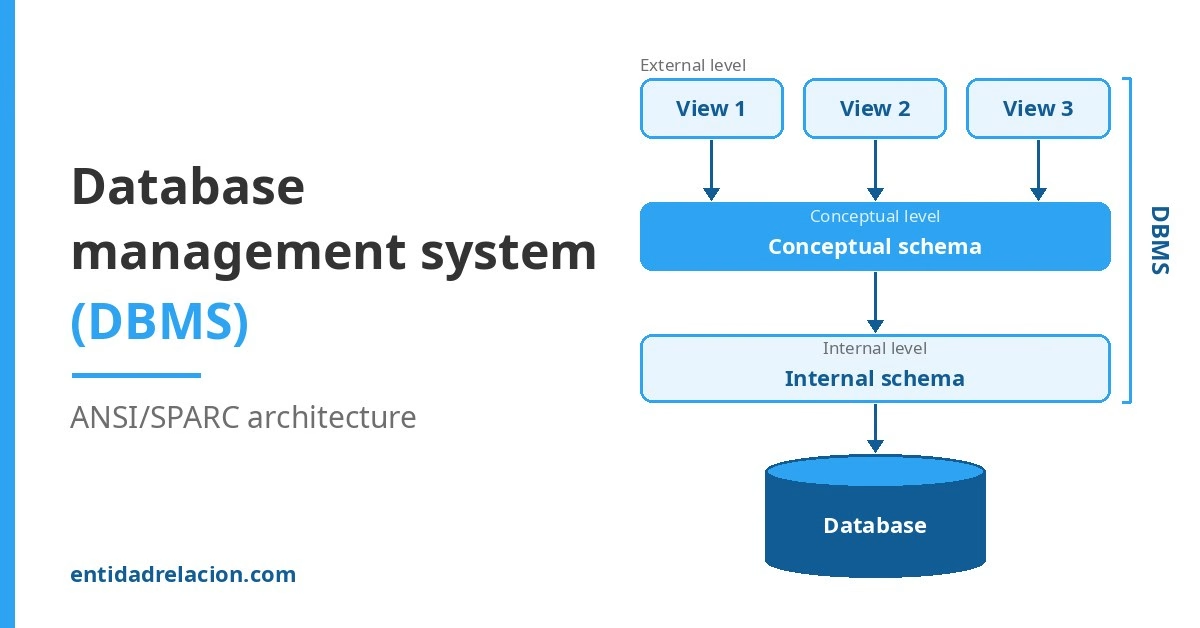
The ANSI/SPARC architecture: three levels
Proposed in the 1970s by the ANSI/X3/SPARC committee, it splits a database into three levels of abstraction:
- Internal (or physical) level: how the data is actually stored (files, indexes, layout on disk).
- Conceptual (or logical) level: what data the whole database holds and how it is related, without going into how it is stored. This is where the designer works.
- External (or view) level: the part of the database that each user or application sees. In SQL it is implemented, among other things, with views.
Keeping the levels separate means one can change without breaking the others:
- Physical data independence: the internal level can change (for example, adding an index or moving the data to another disk) without touching the conceptual level.
- Logical data independence: the conceptual level can change (for example, adding a column or a table) without modifying the views or the applications that do not use it.
DBMS languages
Several languages are used to talk to a database management system. In relational databases, they are all part of SQL:
| Language | What it is for | SQL statements |
|---|---|---|
| DDL (data definition language) | Creating and changing the structure | CREATE, ALTER, DROP |
| DML (data manipulation language) | Querying and changing the data | SELECT, INSERT, UPDATE, DELETE |
| DCL (data control language) | Granting and revoking permissions | GRANT, REVOKE |
| TCL (transaction control language) | Confirming or undoing changes | COMMIT, ROLLBACK |
See DDL and DML in action in how to create and manipulate SQL tables.
The data dictionary
It is the database that describes the database itself (its metadata). Among other things, it stores:
- The name, type and size of each piece of data.
- The relationships between tables.
- The integrity constraints.
- The users and their permissions.
- Usage statistics, which the query optimizer relies on.
To be useful, the dictionary must be built into the DBMS and update itself with every structural change. In practice it is queried like any other table: the SQL standard provides it as INFORMATION_SCHEMA, used by MySQL and PostgreSQL, and Oracle has its own dictionary views, such as USER_TABLES.
Who looks after the database
- Data administrator: decides which data is stored and the policies for managing it. It is more of an organizational role than a technical one.
- Database administrator (DBA): the technician who puts those decisions into practice. The DBA has the highest privileges in the system, and their usual tasks are:
- Choosing and installing the database management system.
- Creating the databases and maintaining their schema.
- Defining access rules and managing user accounts.
- Scheduling and checking backups.
- Monitoring performance and applying security updates.
Drawbacks of database systems
- They need specialist staff to design and maintain them.
- They have costs: servers, licenses for commercial products, or pay-as-you-go fees in the cloud.
- They centralize information: if the server fails, everything stops. That is why they are combined with backups, replicas on other servers and uninterruptible power supplies (UPS).
Even so, for any application that handles shared data, the advantages far outweigh them.
Frequently asked questions
What is the difference between a database and a DBMS?
The database is the organized data; the DBMS is the program that manages it. For example, a shop's database (customers, products, orders) can be managed by MySQL, which is the DBMS.
Is MySQL a database?
Not exactly: MySQL is a database management system. With MySQL you can create and manage many different databases. The same goes for PostgreSQL, Oracle or SQL Server, even though people often say "the MySQL database" in everyday speech.
What is the ANSI/SPARC architecture?
A model that splits a database into three levels (internal, conceptual and external) so that how the data is stored, or what data there is, can change without affecting users or applications. It is the basis of physical and logical data independence.
Which DBMS is best for learning?
Any open-source one is a good start: PostgreSQL and MySQL are the most widely used, and SQLite needs no server at all. What matters is learning SQL and database design, which apply to all of them. If you are just starting out, continue with the introduction to databases and the entity-relationship model.
This content started as notes for the Database Management module of a Spanish vocational course in network systems administration (ASIR). I revised, corrected and expanded it in 2026.
0 Comments